![Bildmarke_only_positive.png]](https://support.3dspark.de/hs-fs/hubfs/Bildmarke_only_positive.png?height=40&name=Bildmarke_only_positive.png)
3D Spark is an intuitive tool designed to streamline your operations, helping you save both time and costs once it is properly configured.
Follow this step-by-step guide to effectively model your materials, machines, process steps, and both costing and pricing structures. You will have the opportunity to tailor 3D Spark to meet the specific needs of your organization. Additionally, you can establish an online portal to present your production capabilities to external customers through the Part Request Portal or to corporate clients via the Supplier Panel.
If your organization is joining mainly as a supplier, we encourage you to follow our streamlined onboarding guide for a quicker setup process: Click
If your organization is joining mainly to use the Part Request Portal (for example on your website), we encourage you to follow our streamlined onboarding guide for a quicker setup process: Click
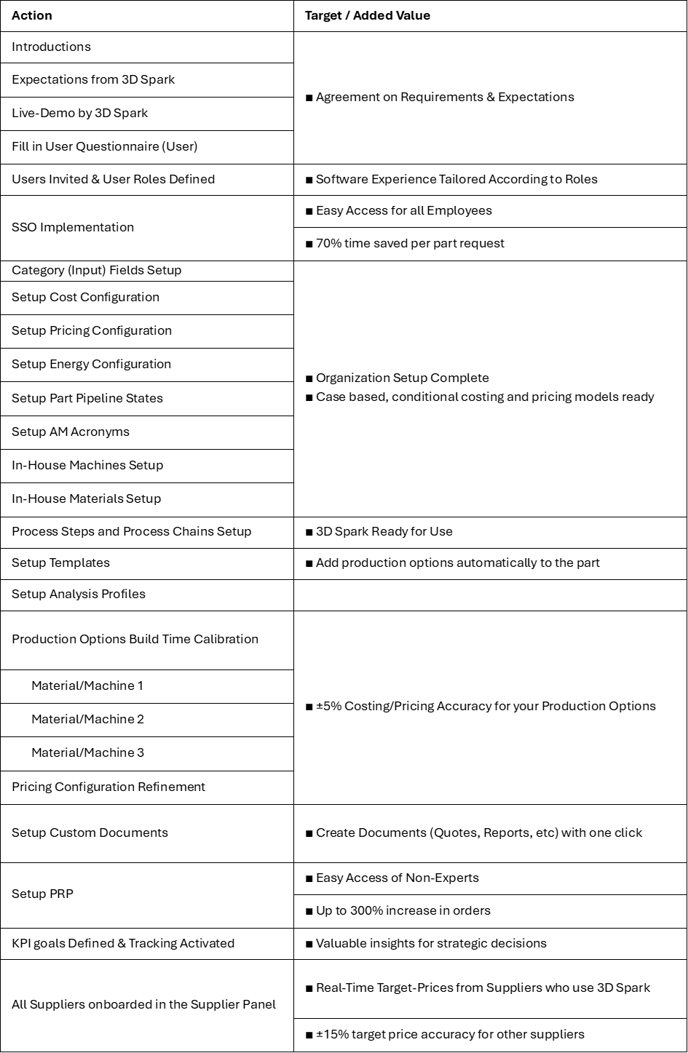
For a complete set-up, you can have a look at the checklist below.
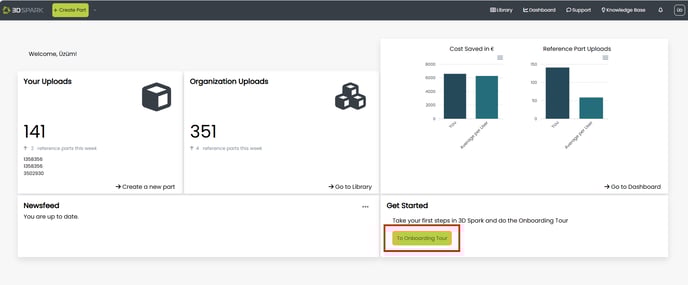
We recommend starting with the 3D Spark Self-Onboarding Tool. Simply log in to 3D Spark and go to the Onboarding Tool:
3D Spark Onboarding Check List for accurate Costing and Pricing
- Adding new machines
- Adding new materials
- Adding new process steps
- Forming process chains and saving templates / analysis profiles
- Fine-tuning machines, materials and process chains
- Collecting information about an order: Category / Information Fields
- Other global organization settings
- Setting up the Part Request Portal (PRP)
3D Spark Onboarding Check List with full features in use