![Bildmarke_only_positive.png]](https://support.3dspark.de/hs-fs/hubfs/Bildmarke_only_positive.png?height=40&name=Bildmarke_only_positive.png)
The Supplier Panel is a module within 3D Spark.
If you are a buyer, it enables you to request real-time pricing information from your suppliers and submit requests for quotations (RFQs).
How to set-up Supplier Panel as a Buyer
If you are a supplier, you have the opportunity to enhance your visibility to customers through their Supplier Panel.
How to set-up Supplier Panel as a Supplier
How to use the Supplier Panel as a Buyer
- Create a part or go to an existing part and go to the Analysis page
- Optional: Analyze your own "make" options: Click here for the guide
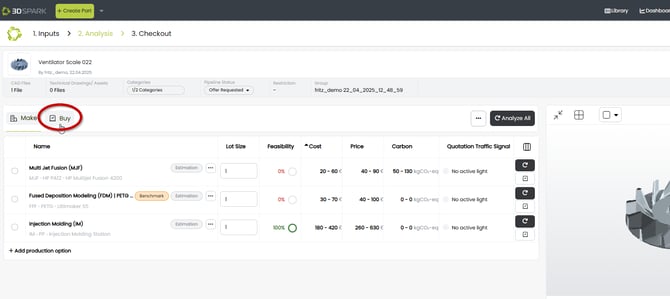
- Go to "Buy" view:
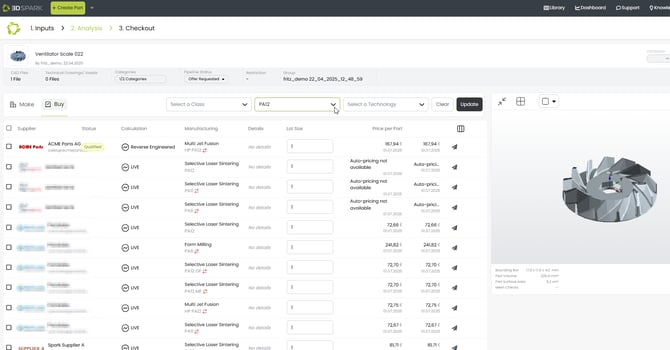
- Apply material and technology filters as needed and you are going to see a list of suitable suppliers:
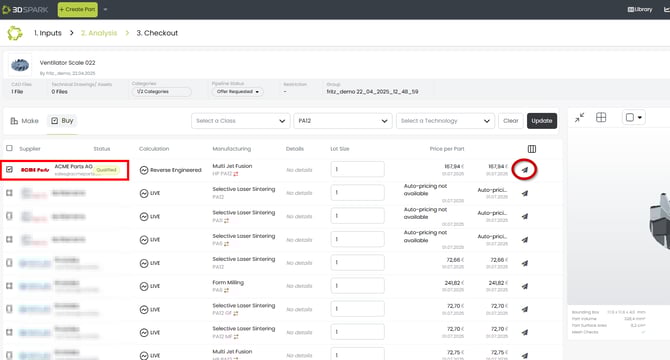
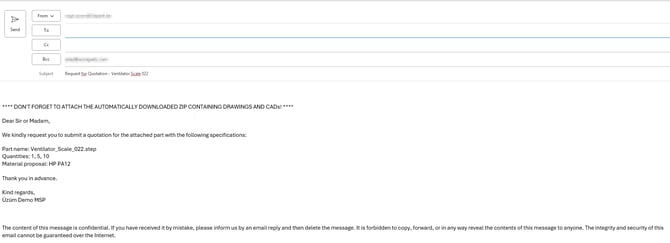
- You can select a supplier and easily send them an RFQ via email:
How to set up: Are you a buyer?
You can onboard your suppliers using one of four methods:
1. If your supplier is a 3D Spark user, they can share live pricing data with your organization.
2. You can leverage historical quotes from your supplier to train a price estimation model, effectively creating a virtual representation of that supplier.
3. If your supplier is not using 3D Spark but has their own pricing tool, it can be integrated with 3D Spark for seamless access.
4. If you prefer, you can send RFQs to your supplier with one-click without prior pricing information.
For assistance in setting up your Supplier Panel, please follow this guide: Click here
For enterprise or exceptional cases please reach out to the 3D Spark Support Team.
How to set up: Are you a supplier?
You can create your online showroom, showcasing your production options and making your prices accessible to potential customers.
For help in establishing your online supplier profile, please follow this guide: Click here