![Bildmarke_only_positive.png]](https://support.3dspark.de/hs-fs/hubfs/Bildmarke_only_positive.png?height=40&name=Bildmarke_only_positive.png)
Production Option vs TEMPLATE vs ANALYSIS PROFILE
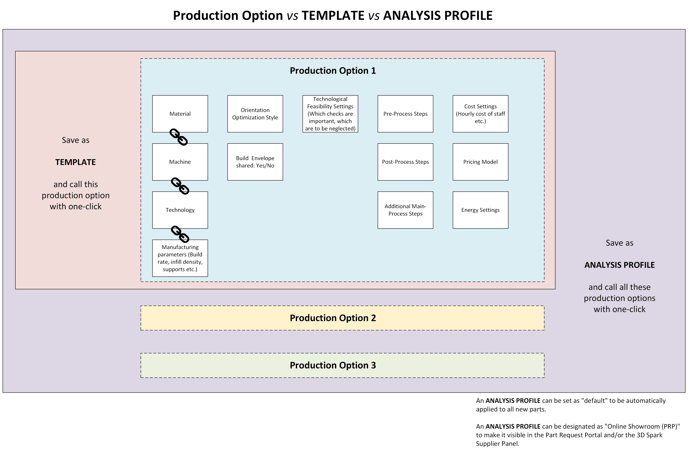
Production Option is a set of manufacturing parameters including the material, machine, technology, process chain, cost settings, pricing configuration etc.
A TEMPLATE allows quick access to a Production Option with a single click. By saving all necessary details of a Production Option as a TEMPLATE, you avoid having to make adjustments each time you use it.
ANALYSIS PROFILE is similar to TEMPLATE, but it allows the user to save multiple Production Options as a collection. ANALYSIS PROFILE has two additional features:
- It can be set as "default" to be automatically applied to all new parts.
- It can be designated as "Online Showroom (PRP)" to make it visible in the Part Request Portal and/or the 3D Spark Supplier Panel.
A user or an organization can have as many TEMPLATES and ANALYSIS PROFILES as they require. But only there can be only one default ANALYIS PROFILE and only one Online Showroom at a given time.
It is important to understand how Production Options in 3D Spark works. Please review this diagram before setting up your Templates and Analysis Profiles:
Click here for a step-by-step guide to save your Templates and Analysis Profiles