![Bildmarke_only_positive.png]](https://support.3dspark.de/hs-fs/hubfs/Bildmarke_only_positive.png?height=40&name=Bildmarke_only_positive.png)
3D Spark can pre-filter your ERP data for suitability of parts for additive manufacturing. Too large parts, for example, do not need additional analysis and they are filtered out. This approach might save significant resources in large Part Screening projects.
How to use the Pre-Filtering tool
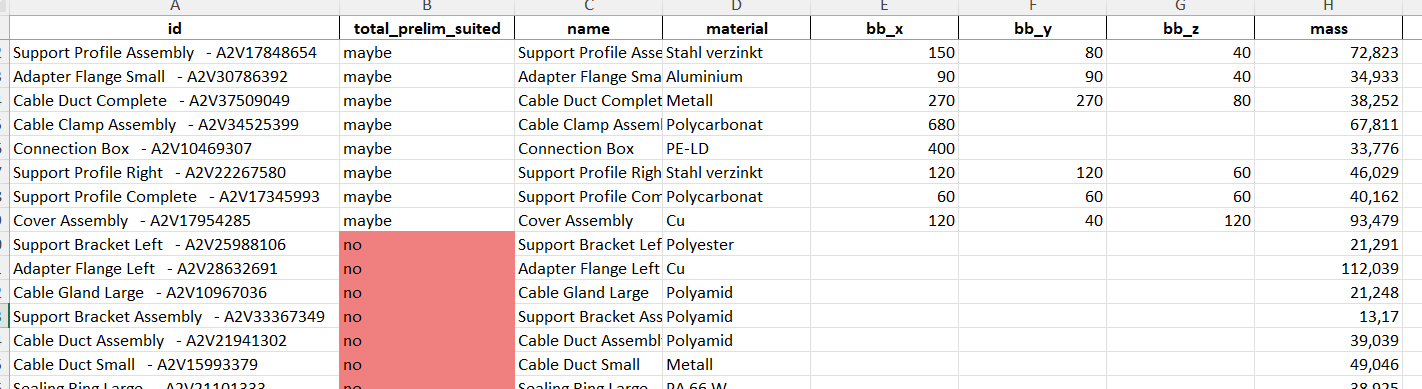
- Organize your ERP data export according to this template: [Download sample input file]
Important: The Excel file must have the name format: *_erp_pre_screening.xlsx
For example: my-erp-export_erp_pre_screening.xlsx
There is no need to handle the conversion manually. 3D Spark provides an Excel utility that transforms your raw ERP export into a compatible format. For assistance or access to this tool, please reach out to the 3D Spark team. - Close the file *_erp_pre_screening.xlsx
- Go to 3D Spark platform > Click [+ Group] (top-left) > Drag & Drop the file *_erp_pre_screening.xlsx
- Within seconds, 3D Spark processes your .xlsx file and provides a ready-to-download .xlsx results file.
[Download sample results file] - The results table can be used for two purposes:
- Review and filter out unsuitable parts
- Use the output spreadsheet to prepare a detailed analysis in 3D Spark.
More information about Part Screening: Click