![Bildmarke_only_positive.png]](https://support.3dspark.de/hs-fs/hubfs/Bildmarke_only_positive.png?height=40&name=Bildmarke_only_positive.png)
After uploading a CAD and adding a Production Option, a preliminary result is displayed. The full calculation includes a technical feasibility analysis, orientation optimization to minimize the cost estimation and a breakeven analysis against milling and casting processes.
The analysis can be tweaked in the Settings panel.
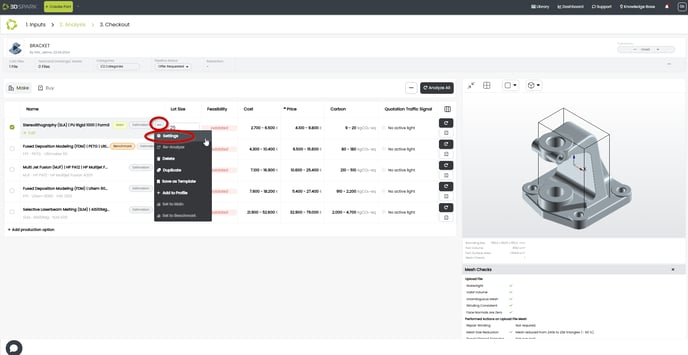
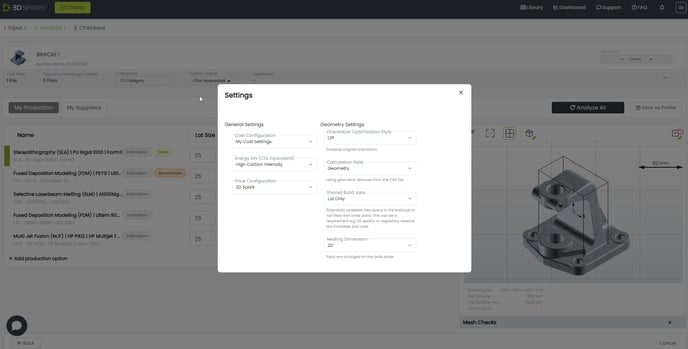
- Cost Configuration defines hourly labor rates and can be set or edited in Organization Settings.
- Pricing Configuration determines the final price based on a set of rules.
- Energy Configuration defines the energy mix, reflecting the carbon footprint of your energy source. It can be set or edited in Organization Settings.
- Orientation Optimization Style adjusts the method for optimizing orientation, with definitions available on the platform.
- Shared Build Jobs allows the build plate to be filled with parts from other projects or reserved solely for the current lot.
- Nesting Dimension can be set to either 2D or 3D.